Bulls Eye · Manufacturing Project Management

AI-driven planning for tool rooms, die shops and manufacturing projects.

Bulls Eye by Smart AI ML Solutions is an AI-based project planning and control system that coordinates operation sequencing, shop scheduling and resource allocation. It helps teams evaluate decisions intended to reduce avoidable delays, project time and cost.

Bulls Eye · live planning view
Recalculating
18Active orders
+4.2%Progress today
2.5 dLatest variance
Design
WIP
Machining
adjust
Assembly
queued
Trial
ready
AI response: resource allocation and downstream timing being reconsidered around the current project state.
↗
Real-time controlMilestones · progress · planned vs actual · remaining effort
Why AI

Manufacturing projects don't behave like static plans.

Bulls Eye is designed around the disruptions and uncertainties that make conventional planning difficult.

Process flow disruptions
Uncertain process sequences
Inaccurate time estimates
Unknown external factors
Uncontrollable internal factors
Plan vs actual deviations
Variation in resource skill levels
Knee-jerk firefighting decisions
The Bulls Eye difference

When reality changes, the plan changes with it.

The central story of Bulls Eye is continuous project control: changes in the project are reflected through planning, resource and management decisions instead of leaving the original schedule behind.

01 · CHANGE

Reality changes

A design, resource, priority, process or timing condition changes.

02 · ANALYZE

AI evaluates impact

Project relationships, resource constraints and technical parameters are considered.

03 · REPLAN

Schedule adjusts

Tasks, resources and timing are recalculated around the current project situation.

04 · DECIDE

Management gets options

Strategic decision support helps evaluate ways to control project targets.

05 · CONTROL

See the new reality

Progress, delays, effort and estimated completion remain visible in real time.

What that looks like in Bulls Eye
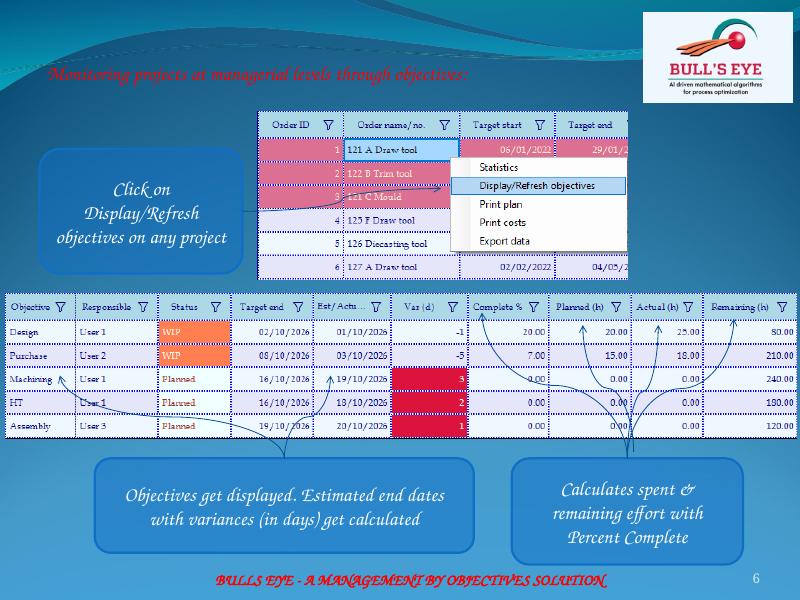
Live project statusLatest estimated end time and progress after scheduling.
Planned vs actualVisual control of hours across order stages.
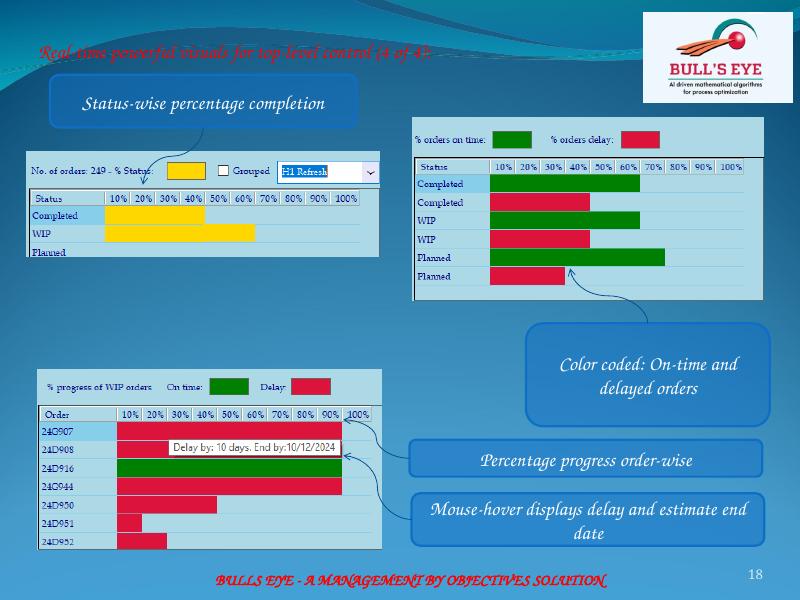
Status & progressOn-time, delayed and progress views for management.

See the planning idea in one glance

Illustrative visualisation of the replanning concept described in the product material.
Plan updating
Before changeOriginal plan
After changeAdjusted plan
Priority consideredResource constraintsSkill / efficiencyTiming impactManagement visibility
The Bulls Eye approach

From project change to an updated operational plan.

The product material describes an AI system that uses self-learning, deep-learning, data analytics, reasoning and self-correcting concepts to manage projects and resources.

01

Project reality changes

Work, resources, priorities and constraints evolve.

02

AI evaluates the plan

Scheduling considers project priorities, resources and constraints.

03

Tasks are allocated

Roles, skills and resource efficiencies influence allocation.

04

Management sees impact

Status, progress, variances, load and productivity become visible.

05

Decisions become actionable

Strategy modeling can support decisions intended to speed projects.

The planning loop in the product
Operational scheduleTasks allocated using priorities, skills and resource-operation mapping.
Objectives & varianceEstimated dates, effort and completion at objective level.
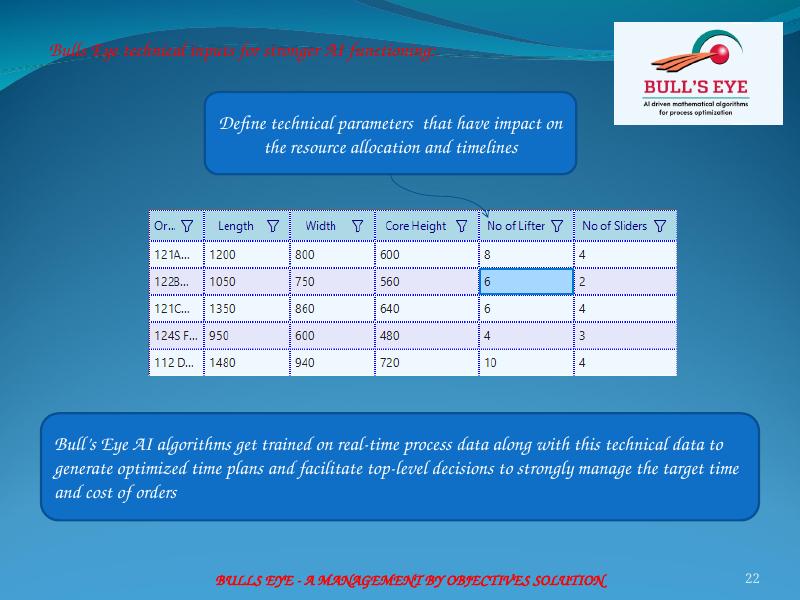
Technical inputsTechnical parameters strengthen planning and decision support.
◈

Automatic scheduling

Schedules design, machine shop, assembly and trial activities and plans/tracks outsourcing jobs.

◎

Concurrent engineering

Supports 100% concurrent engineering across the project workflow.

⌁

Resource-aware planning

Scheduling accounts for shop resource constraints, roles, skill levels and efficiencies.

↗

Strategic decisions

AI modeling supports management decisions for controlling project targets.

▦

Objective-level control

Monitor estimated end dates, variance, effort and percentage completion through objectives.

◉

Real-time visual control

Color-coded progress, planned vs actual hours, remaining hours and order status provide top-level visibility.

Bulls Eye operational scheduling screen
Operational scheduling

Turn project priorities into an operational schedule.

The AI engine calculates planned start and end times and allocates tasks to resources using resource-operation mapping and its learning capabilities.

  • Project and task priorities
  • Employee skill sets
  • Optimization for task completion time
  • Automatic scheduling within resource constraints
Bulls Eye top-level monitoring visuals
Management visibility

See where the project really stands.

Real-time visuals show milestone completion, delays, planned vs actual hours, remaining hours and status-wise progress.

  • Milestone and stage progress
  • Planned vs actual hours
  • Actual vs remaining hours
  • On-time and delayed orders
Seven AI capabilities

AI is applied to specific planning and control problems.

Each capability below is paired with the corresponding Bulls Eye screen from the product material. Click an image to view the full-size screen.

01 · Top-level decision-makingStrategic decisions on resources, outsourcing and order prioritization to cut project time and cost.
02 · Time predictionPredict and fine-tune time estimates for operations.
03 · Resource rankingRank resources using productivity and technical parameters relevant to the task.
04 · Process sequenceProvide options to change the pre-operation sequence to reduce job waiting time.
05 · Task splittingProvide the maximum time possible to split a task to reduce completion time.
06 · Natural-language agentProvide real-time answers through a natural-language AI agent.
07 · Mobile AI agentExtend the natural-language AI agent experience to mobile.
Bulls Eye technical inputs screen
AI inputs

Feed the planning engine with the technical reality of the shop.

Technical parameters that affect resource allocation and timelines can be defined. The material describes combining these parameters with real-time process data for optimized time plans and top-level decision support.

Manufacturing use cases

Planning software for tool rooms, die & mold work, and product development.

Bulls Eye brings project scheduling, resource allocation, real-time control and AI-supported decision making into manufacturing workflows. Explore the use cases that match your operation.

Tool rooms

Tool room planning & shop scheduling software

Plan and control design, machining, assembly, trial and related work with resource-aware scheduling and real-time visibility.

  • Tool room planning software
  • Tool room shop scheduling software
  • Tool room management software
Explore tool room planning →
Die & mold manufacturing

Die-shop & mold manufacturing planning

Apply Bulls Eye's project planning and scheduling approach to complex die and mold manufacturing programs where priorities, resources and process timing must stay visible.

  • Die-shop planning software
  • Mold-making planning software
  • Mold manufacturing planning software
  • Diecasting die manufacturing planning software
Explore die & mold planning →
Product development

New product design & development planning

Coordinate new product design and development work with objectives, operational schedules, resource constraints, progress tracking and AI-supported decisions.

  • New product design planning software
  • Product development planning software
  • AI project scheduling and control
Explore product development planning →
“Bulls Eye – Artificial intelligence system for projects control.”Product positioning from the supplied Bulls Eye presentation.
Smart AI ML Solutions

See how Bulls Eye can bring AI into project control.

Contact us for a demonstration or to discuss how Bulls Eye can support design, development and manufacturing project control.

Smart SolutionsT18/405, Vanagram, Chennai - 600095
India
Request a demo →